APEX Racer - Pixel Cars
- 4.3
- Rating
- 1.00M
- Installs
- Free
- Price

 Analysis by App-foxy
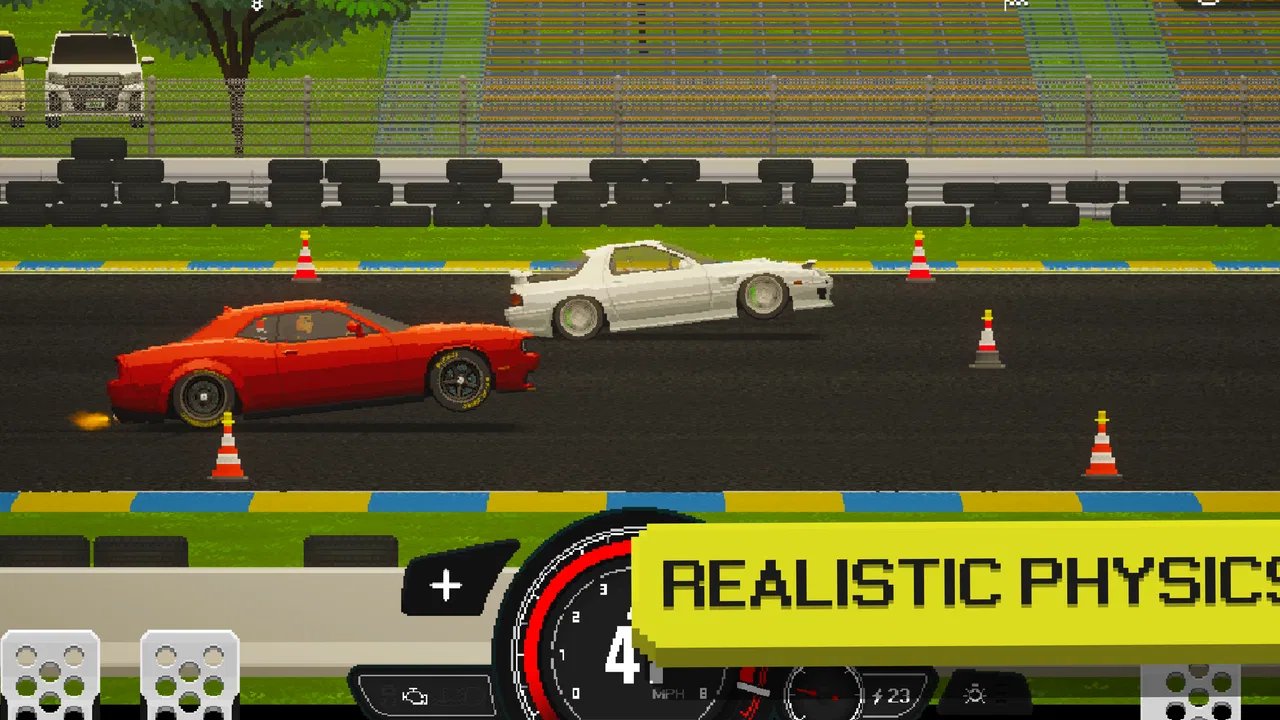
I spent time with APEX Racer - Pixel Cars as a compact racing game built around the appeal of customizing and driving pixel-styled vehicles. It comes from PIXELDEV GAMES, is free to download, and sits in the racing category for Everyone. My first impression was that it aims for a very specific mood: quick car-focused play with a retro visual identity, rather than a realistic driving simulator that tries to reproduce every detail of a real vehicle.
That distinction matters before you install it. If you want a game that feels immediately approachable and visually distinctive, this is an appealing choice. If you are looking for a serious simulation with complex handling, licensed cars, or a huge open world, I would look elsewhere. What makes this game interesting is the way its pixel presentation gives the cars personality while keeping the experience lighter and easier to pick up than many large racing games.
How the racing experience feels in everyday play
I find the everyday appeal lies in how easy it is to turn a spare moment into a focused test drive: choose a car, pay attention to how it feels, then decide whether another run is worth it. That makes the game more satisfying when I give each attempt a small purpose instead of tapping through on autopilot. The next section looks at how those runs create a rhythm of feedback and adjustment.
You May Also Like

 Pandora - Music & Podcasts
Pandora’s Music Is Easy to Start, but Harder to Recover
Pandora’s strength is its low-effort path from a seed to a station. Its weak spot is how much confidence it asks you to place in connection, setup, and quiet recovery.

 8 Ball Pool
 Is Built on Rivalries, Rematches, and Routine
A close look at the rivalries, rematches, shared routines, and unanswered safety questions that turn a quick pool match into a persistent mobile community.

 Samsung Music
’s Quiet Strength Is Playing What You Already Own
Its reach comes less from spectacle than from dependable access to a personal library. That simplicity is both the app’s strongest retention engine and its ceiling.

 AccuWeather: Weather Radar
AccuWeather Review: A Quick, Clear Forecast for Everyday Decisions
For everyday plans, the best forecast is the one you can understand quickly. AccuWeather makes rain timing, radar, and local conditions easy to act on, with a few trade-offs.

 Hill Climb Racing
Why Hill Climb Racing Still Turns Crashes Into One More Run
A tiny car, a bumpy hill and one more upgrade: Hill Climb Racing keeps resurfacing because its simple chaos makes every near-miss feel personal.

 AliExpress - Shopping App
AliExpress Makes Global Shopping Feel Personal, but Shoppers Bear the Risk
AliExpress turns a global marketplace into a pocket-sized discovery engine. Its reach is useful, its shopping loop compelling, and its trade-offs easy to miss.
More From Our News Desk
View All News


Speed that feels immediate rather than realistic
The sense of speed here comes mainly from the arcade-style presentation and the close attention given to the cars. Pixel graphics do not automatically mean slow or simplistic, and the game uses that visual language to make movement feel clear without covering the screen in unnecessary detail. I found it easier to focus on the road and the vehicle itself than in many visually crowded racers.
That makes it a good fit for short sessions. I can imagine opening it while waiting for an appointment, playing a few races, and stopping without feeling that I have abandoned a long simulation session. The cars remain the central attraction, so even a brief visit can feel worthwhile when I am in the mood to adjust a vehicle, test it, and try again.
The trade-off is that the pixel presentation will not satisfy everyone. Players who judge racing games mainly by realistic lighting, highly detailed environments, or cinematic replays may find the visual style too deliberately old-school. I see that as a design choice rather than a flaw, but it narrows the audience. The game works best when you enjoy the character of pixel cars instead of expecting a console-style visual showcase.
One useful way to approach the driving is to treat each run as a test of control and setup rather than simply chasing a dramatic spectacle. Small changes to how I think about a car can affect whether a race feels comfortable or frustrating. I recommend changing one thing at a time when experimenting. That makes it easier to understand what helped, instead of changing several elements and having no idea why the result improved or worsened.
Why the car-building focus changes the pace
The central appeal is not only crossing the finish line. The idea of building an ultimate pixel car gives the game a workshop-like rhythm: drive, evaluate, adjust, and return to the road. That loop is more satisfying for players who enjoy gradual improvement than for people who want every race to be a completely separate event.
I particularly like this structure for users who enjoy comparing small decisions. A car that looks excellent is not necessarily the one that feels easiest to control, and a setup that helps in one situation may not be the most comfortable choice in another. Even without turning the game into a spreadsheet exercise, it rewards paying attention to how a vehicle behaves instead of blindly selecting the most attractive option.
My practical tip is to keep a mental note of what you were trying to improve before each change. If the goal is better control, judge the next run on control. If the goal is a faster-feeling car, judge how quickly you can respond and recover. This simple habit prevents customization from becoming random decoration and helps turn the pixel-car theme into a meaningful part of the play.
What happens during heavier play
Longer sessions reveal a different side of the game. A short race can feel light and focused, but repeated attempts place more attention on loading, menus, customization, and the number of visual elements being handled at once. I would not assume that every phone will behave identically, especially because Android devices vary widely in age, hardware, and background activity.
On a phone that is already busy, the sensible approach is to close apps you are not using and avoid judging the game during the first moments after launching several demanding tasks. That is not a special trick for this title; it is simply the best way to give a mobile racing game a fair test. If the phone has limited free space or is running an older system, keeping expectations moderate is wise.
The game supports Android 8.0 and later, which makes it available to a broad range of devices. Compatibility, however, is not the same as identical performance. A phone that can install the game may still offer a different experience from a newer model, particularly during extended play or when the device is warm. I would test it in the exact conditions in which I expect to use it, rather than relying only on whether installation is possible.
For a realistic everyday scenario, imagine playing on a commute while the phone is already handling music, messages, and a weak mobile connection. I would start with a short session, watch for touch-response changes, and avoid making a long customization plan until I knew the device stayed comfortable. If the game remains responsive, it is well suited to that kind of routine. If the phone begins to struggle, shorter runs are more sensible than forcing a long session.
Stability, interruptions, and getting back into the game
Reliability is especially important in a racing title because a small interruption can break concentration. A notification, a brief loss of attention, or a pause while switching apps can make a run feel wasted. My advice is to treat the game as best suited to focused bursts rather than assuming every session will be ideal for multitasking.
Recovery also depends on how you organize your play. Before making a major change to a car, I would finish a test run or remember the previous setup. That gives you a reference point if you need to leave the game unexpectedly. It is a small habit, but it reduces the frustration of returning without remembering what you changed or why the car felt better before.
I also recommend giving the title a little time after an update or a fresh installation before deciding whether it belongs in your regular rotation. The current version is 0.9.51, and version numbers can change how a game feels over time. I would judge the experience you actually receive on your device, especially if you care about long sessions, rather than treating the first launch as the whole story.
The large audience is encouraging: the game has passed one million installs, with an average rating of 4.6 from roughly thirty-two thousand ratings and around two thousand written reviews. Those figures suggest that many players find the concept appealing, but they do not guarantee that every phone, control preference, or racing expectation will match yours. I read that reception as a reason to try it, not as a substitute for personal testing.
Device limits and practical expectations
Because it is free to download, the barrier to trying it is low. The game is rated Everyone, which also makes it easier to recommend as a casual racing option for a broad audience. The more important question is whether you enjoy the particular combination of pixel visuals, car building, and repeat attempts.
Storage and battery behavior are worth considering with any game that encourages repeated races and customization. I would avoid starting a long session when the phone is already low on battery or noticeably warm. Even if the game runs acceptably, heat and battery limits can change how enjoyable touch controls feel. Playing in shorter blocks is the safer routine for older phones.
Another constraint is attention. This is not the ideal choice if you want something you can play almost entirely while distracted. Racing requires enough concentration to react, and the customization loop works better when you remember what you are testing. For a person who wants a background game that can be ignored for several minutes, a slower puzzle or idle title may be a better match.
On the other hand, the game is a strong candidate for someone who dislikes oversized racing downloads or realistic driving games that demand a lot of commitment. The pixel style gives it a clear identity, and the car-centered approach makes it easier to understand what the game wants from you. I would recommend trying it on the device you use most often, then deciding whether its pace and presentation fit your habits.
Free entry and the role of purchases
The game costs nothing to download, but it includes in-app purchases priced from $0.99 to $14.99 per item. That is important for anyone who prefers a completely purchase-free experience. I would begin without spending anything and first decide whether the driving and customization loop are enjoyable on their own.
My strongest advice is to avoid buying something simply because a car or adjustment looks tempting in the moment. Play enough to understand what kind of racing experience you actually want. If you enjoy the core loop, a later purchase can be considered more calmly. If the controls or pixel style do not suit you, spending money will not solve that basic mismatch.
This also affects who should skip the game. Players who want a racing title with no optional spending at all may prefer a paid alternative with a clearly defined purchase model. Likewise, anyone who dislikes progression built around collecting and improving cars may find the central attraction less compelling than the store summary suggests.
How it compares with familiar racing alternatives
Compared with realistic mobile racers, this game is less about reproducing the look and feel of a real driving environment and more about giving cars a recognizable pixel identity. That makes it easier to approach, but it also means the visual and mechanical experience may feel less serious to simulation fans.
Compared with endless-runner racing games, it offers a more deliberate relationship with the car. You are not only reacting to an endless stream of obstacles; you are also thinking about the vehicle you are building and how it feels across repeated attempts. That extra layer is the reason I would choose it over a purely reflex-based racer when I want something with a stronger sense of ownership.
Compared with large, content-heavy racing games, its appeal is focus. You are not installing it because you need a complete driving universe. You are installing it because pixel cars and the build-test-repeat loop sound fun. If you want a game for occasional sessions and enjoy making a vehicle feel like your own, that narrower purpose is a strength.
There is also a social expectation to manage. A rating of 4.6 and more than a million installs show that the concept has reached a substantial audience, but popularity does not make it a universal replacement for every racing game. I would pick this one for style and customization, a simulation for realism, and an arcade racer for instant action with fewer decisions between runs.
Small habits that make the experience better
First, make changes gradually. The temptation in a car-building game is to alter everything at once, but that makes the result difficult to understand. One adjustment followed by one test run gives you useful feedback and helps you develop a personal sense of what works.
Second, separate appearance from performance in your own thinking. A visually impressive car can still be awkward to drive, while a less flashy setup may feel more dependable. If you are preparing for a difficult run, choose the vehicle that gives you confidence rather than the one that merely looks best in the garage.
Third, use short repeatable sessions when testing a phone. Try the same kind of run after the device has been idle, then again after you have used other apps. This gives you a more realistic idea of whether the game fits your daily routine. It is more useful than judging performance only during a perfect, uninterrupted test.
Finally, decide early whether you enjoy experimentation. The most satisfying part for me is not merely selecting a car; it is noticing how a change affects the next attempt. If that process sounds tedious, the game may feel repetitive. If it sounds appealing, the same loop can provide a surprising amount of replay value without requiring a huge amount of time at once.
My recommendation after playing
APEX Racer - Pixel Cars is a focused racing game with a clear visual personality and an enjoyable build-and-test idea. PIXELDEV GAMES has chosen a direction that stands apart from the usual push toward realism: the cars are the stars, and the pixel style makes the experience feel more like a personal collection of playable machines than a generic driving showcase.
I would recommend it to casual racers, retro-style game fans, and players who like improving a vehicle through repeated experiments. It is especially suitable for short sessions, provided your phone handles the game comfortably and you are willing to give the races your attention. The free entry makes trying it easy, while the optional purchases mean I would keep a little discipline around spending.
I would skip it if your priority is realistic handling, a massive open world, or a racing game that works well while you are only half paying attention. In those cases, a simulation-focused or simpler arcade alternative will probably fit better. For everyone else, the combination of approachable racing and pixel-car customization is distinctive enough to deserve a test.
My final view is positive but specific: this is not trying to be every kind of racing game, and it should not be judged as one. Its strengths are the focused car identity, the accessible presentation, and the satisfaction of making small changes before returning to the road. If those are the parts that attract you, the game offers a convincing reason to keep coming back. If you only want visual realism or instant races with no setup decisions, its limitations will become obvious quickly.
FAQs for APEX Racer - Pixel Cars
01What is the main gameplay experience of APEX Racer - Pixel Cars?
APEX Racer - Pixel Cars offers a throwback to classic pixel art racing games. Players can collect and customize a wide range of pixelated cars. The focus is on improving car performance through upgrades and mastering various tracks. With its engaging arcade style, it combines nostalgia with modern-day racing mechanics.
02How does the customization system work in APEX Racer - Pixel Cars?
The customization system in APEX Racer - Pixel Cars is robust, allowing players to modify their vehicles extensively. You can upgrade engines, tires, and other components to enhance performance. Additionally, visual customizations such as paint jobs and decals let players personalize their cars, making each ride unique and reflective of individual style.
03Is APEX Racer - Pixel Cars suitable for offline play?
Yes, APEX Racer - Pixel Cars can be enjoyed offline, making it perfect for playing on the go without the need for a constant internet connection. However, some features like leaderboards and certain events may require online access for full functionality and to compete with friends globally.
04What types of cars are available in APEX Racer - Pixel Cars?
APEX Racer - Pixel Cars features a diverse collection of vehicles, ranging from classic muscle cars to sleek sports cars. Each car is designed with pixel art aesthetics, and players can unlock new models through gameplay progression. The variety ensures there’s something for every car enthusiast.
05Are there in-app purchases in APEX Racer - Pixel Cars?
Yes, APEX Racer - Pixel Cars includes in-app purchases. These allow players to buy currency or special items that can enhance gameplay, such as exclusive cars or premium upgrades. While the game is free to play, these purchases provide an option to accelerate progress or customize cars further.
Pros
- Highly customizable car options.
- Smooth and responsive controls.
- Engaging pixel art style.
- Frequent updates and new content.
- Active online community support.
Cons
- In-app purchases can be pricey.
- Occasional server connection issues.
- Limited track variety.
- Ads can be intrusive at times.
- Requires a stable internet connection.

APEX Racer - Pixel Cars
Gallery